
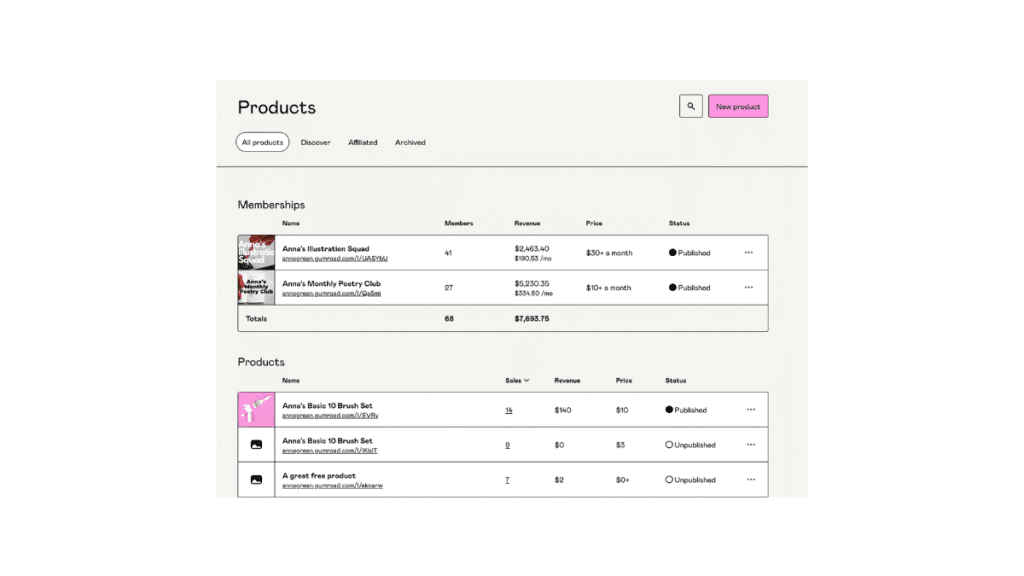
When I first started creating content, I had a simple goal.
I wanted to build a digital product and sell it online.
Creating the product wasn’t the hard part. The real challenge was figuring out how to sell it without building a complicated website or managing payment systems.
That’s when I discovered Gumroad.
Many creators today choose Gumroad because it removes most technical barriers. You can upload a product, set a price, and start selling quickly.
In this guide, you’ll learn how to sell digital products on Gumroad step by step, how to optimize your product page, and how creators turn simple digital ideas into real income.
If you’re building a long-term monetization system, this guide works well alongside How to Monetize an AI SEO Blog.
Table of Contents
ToggleWhat Is Gumroad and How Do Creators Use It?
Gumroad is a platform that allows creators to sell digital products directly to their audience.
Creators sell digital products on Gumroad by uploading a digital file, setting a price, and sharing the product page with their audience.
The platform automatically handles:
payment processing
secure checkout
product delivery
tax and VAT compliance
Because of this automation, Gumroad is one of the easiest platforms for creators who want to sell digital products such as:
eBooks
templates
online courses
digital planners
design assets
Why Gumroad Is Popular for Digital Products
Many creators choose Gumroad because it simplifies digital sales.
Unlike traditional e-commerce platforms, Gumroad focuses specifically on creators who want to launch products quickly.
Some of the main advantages include:
Built-In Payment Processing
Gumroad supports credit cards, PayPal, and international payments automatically.
Email Collection
Every purchase allows creators to collect customer emails and build an audience list.
Affiliate System
Creators can allow affiliates to promote their products in exchange for commission.
According to the official Gumroad platform, creators can sell digital products globally while the platform manages payment infrastructure.
Steps to Sell Digital Products on Gumroad
Selling digital products on Gumroad is a straightforward process.
Here are the main steps.
Create a Gumroad account
Upload your digital product
Write a clear product description
Set your pricing
Publish and share your product page
Many creators launch their first product in less than an hour.
Step 1: Validate Your Digital Product Idea
Before creating a product, validate your idea.
People don’t buy files.
They buy solutions.
Ask yourself:
What problem does my product solve?
Who needs this solution?
Why would someone pay for it?
Examples of popular digital products include:
Notion productivity trackers
Canva templates
blogging planners
niche eBooks or guides
If your blog still struggles with traffic, you may want to read Why Your Blog Gets No Traffic in 2026, which explains common growth challenges.
Step 2: Set Up Your Gumroad Store
To begin selling, go to the Gumroad website and create your account.
After signing up, you’ll need to configure a few settings:
payout method (PayPal or bank transfer)
store logo and banner
profile description
Once your store is ready, you can upload your first product.
Most creators complete this process in less than 30 minutes.
Step 3: Create a High-Converting Product Page
Your product page determines whether visitors decide to buy.
Focus on three key elements.
Clear Product Title
Your title should clearly explain the value of your product.
Example:
Digital Blog Planner for Content Creators
Benefit-Focused Description
Explain how the product helps the buyer.
Focus on benefits such as:
saving time
improving productivity
solving a specific problem
High-Quality Product Images
Images increase trust and help customers understand what they will receive.
Recommended size:
1200 × 628 px.
Step 4: SEO for Your Gumroad Product Page
Many creators forget that Gumroad product pages can appear in Google search results.
To improve visibility:
include the phrase sell digital products on Gumroad in the title or description
write structured paragraphs
use bullet lists
add descriptive image alt text
SEO can send buyers to your product page for years.
If you want to understand SEO structure better, explore SEO for Creators: Smart Search Strategies to Grow Your Content in 2026.
Step 5: Marketing Your Digital Product
Creating a product is only part of the process.
Marketing is what drives sales.
Common promotion channels include:
Social Media
Share your product on platforms like:
Twitter / X
LinkedIn
Instagram
Pinterest
Behind-the-scenes content often builds trust with your audience.
Email Marketing
Email remains one of the most powerful marketing tools.
You can send:
product announcements
special offers
tutorials related to your product
Free Lead Magnets
Offer a free resource such as:
checklist
template
short guide
This attracts potential customers and grows your email list.
Step 6: Use Gumroad’s Affiliate System
Gumroad also allows creators to enable affiliate marketing.
Other creators can promote your product and earn commission from each sale.
This strategy expands your product reach without running paid ads.
Affiliate marketing combined with digital products creates a powerful monetization system.
Step 7: Scaling Your Digital Product Business
Once your product begins generating sales, the next step is scaling.
Successful creators rarely rely on a single product.
Instead, they build an ecosystem of products.
Examples include:
product bundles
premium versions
updated editions
additional templates
You can also create automated email sequences to promote related products.
Common Mistakes When Selling Digital Products
Many creators struggle because they make avoidable mistakes.
Common examples include:
creating products without validation
writing weak product descriptions
relying only on social media traffic
ignoring SEO completely
Instead, treat every product as part of a long-term digital asset system.
FAQs
Is Gumroad good for beginners?
Yes. Gumroad is beginner-friendly because it handles payments, product delivery, and checkout automatically.
What digital products sell best on Gumroad?
Popular products include eBooks, templates, digital planners, courses, and creative assets.
Do I need a website to sell on Gumroad?
No. You can sell directly through your Gumroad product page without building a full website.
How do creators promote Gumroad products?
Creators usually promote their products through blogs, social media, email lists, and affiliate partners.
Final Thoughts
Learning how to sell digital products on Gumroad is not just about uploading files.
It’s about creating solutions people actually need.
You don’t need a complex website.
You don’t need a large team.
You only need:
a clear problem
a helpful product
a platform that simplifies the process
Start small.
Improve your product based on feedback.
Your first sale is not the final goal.
It’s the beginning of a sustainable digital income system.

Fatima is the founder of SmartCreatorAI25, a blog that helps creators and bloggers use AI tools to grow smarter online. She shares practical guides about AI writing, monetization, and smart productivity.
Comments are closed.