
Table of Contents
ToggleIs Your AI Content Ranking? Or Is Google Ignoring Your Blog?
Let’s be honest.
You write a blog post. You publish it. Then you wait.
However… nothing happens.
No traffic. No ranking.
So you ask:
Why is my blog not indexed on Google?
In many cases, the issue is not just content.
It’s often related to indexing issues in Google Search Console.
Here’s the truth:
It’s not about AI.
It’s about the human touch.
In my experience, after 9 months of blogging, I noticed this:
- AI content alone struggles
- Human content gets indexed faster
Why Your Blog Is Not Indexed on Google (Main Reasons)
There are clear reasons.
However, most beginners miss them.
Common problems:
- Low-quality content
- Weak On-Page SEO
- No internal linking
- No real experience
Because of this, Google ends up not indexing pages properly.
Step 1: Add Personal Experience (E-E-A-T)
Google trusts real people.
My experience
At first, I used AI for everything.
I published fast. But nothing worked.
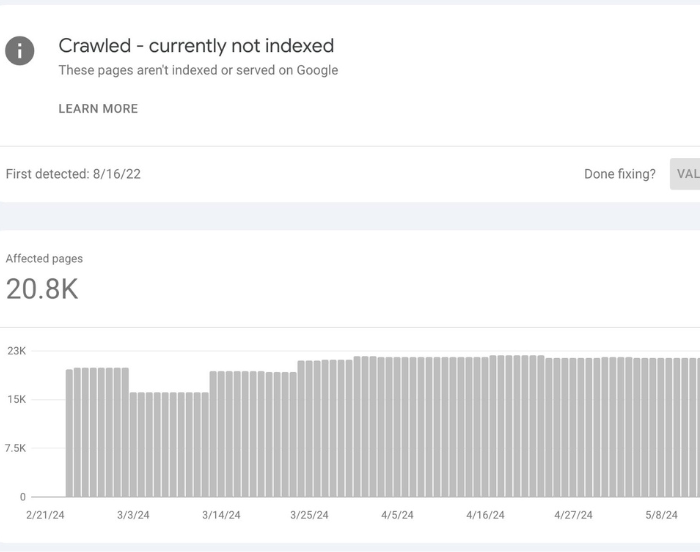
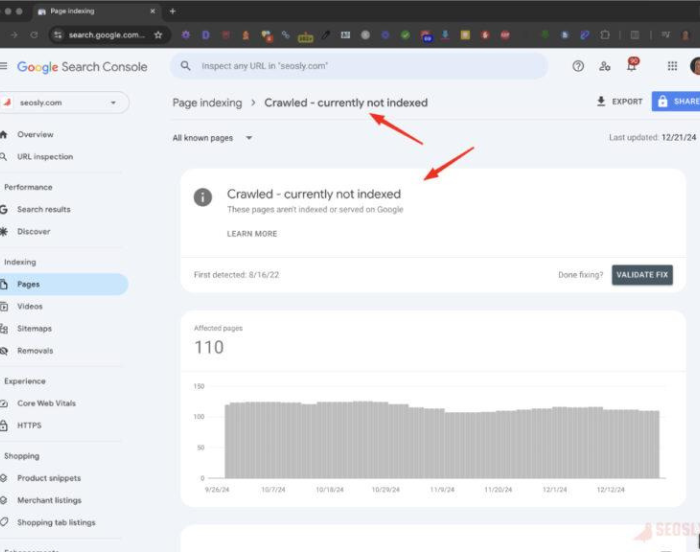
Many pages stayed in:
Crawled – currently not indexed
It was frustrating.
What changed?
I started writing like a human.
- I shared my experience
- I used “I”
- I showed results
Then indexing improved
Step 2: Fix the AI Voice (On-Page SEO)
AI sounds robotic.
However, Google detects patterns.
Avoid:
- Delve
- Transform
- Unleash
Rule:
Write like you talk
Short sentences help.
Simple words work better.
Improving your On-Page SEO also helps fix
indexing issues in Google Search Console
Step 3: Add Original Value
Google wants something new.
Add:
- Real examples
- Personal insights
- Data
According to experts on Search Engine Land, Google prioritizes helpful and original content.
Example:
| Feature | AI Content | Human Content |
|---|---|---|
| Indexing | Low | High |
| Trust | Weak | Strong |
This is why many face Google not indexing pages
Step 4: Internal Linking Strategy
Google needs paths.
Think:
- Google = traveler
- Links = roads
No links = no discovery
Add links:
- Learn more about On-Page SEO
- Fix Google not indexing pages
- Guide: /get-blog-indexed-google
Step 5: Optimize for Featured Snippets
Here’s a quick answer:
Can Google detect AI content?
Answer:
Google does not penalize AI content itself. However, it evaluates quality, usefulness, and originality. If your content is helpful and humanized, it can rank well. Low-quality content is less likely to be indexed or ranked.
Step 6: Technical SEO Checklist
Before publishing:
Short URL
Keyword in title
Meta description < 160
ALT text
Internal links
You can learn more from Google Search Central about indexing best practices.
FAQ
Snippets (SEO BOOST)
Why is my blog not indexed on Google?
Google may not index your blog if your content lacks value or SEO. Improving quality and internal linking helps fix this quickly.
How do I fix indexing issues in Google Search Console?
Improve content, add links, and request indexing. Make sure your page provides real value.
What does crawled but not indexed mean?
It means Google visited your page but didn’t find enough value to include it in search results.
Can AI content rank?
Yes. However, it must be useful, original, and humanized.
Conclusion: Fix Your Indexing Today
Now you understand:
why your blog is not indexed on Google
You also know how to fix:
- Google not indexing pages
- Indexing issues in Google Search Console
- Weak SEO
Follow these steps and your blog will improve fast.
Ready to Take Action?
Download my AI Content Checklist
Final Thought
If your blog is not indexed…
It’s not luck.
It’s strategy.
And now, you have it

Fatima is the founder of SmartCreatorAI25, a blog that helps creators and bloggers use AI tools to grow smarter online. She shares practical guides about AI writing, monetization, and smart productivity.